light/dark mode

chapter 3

signals

In the previous lessons we've explored how to create sound is (vibrations in the air) digitally by telling our speakers how to vibrate. We do this by creating an Audio Buffer, which can contain multiple channels (an array/list of values) each responsible for a different. These channels are filled with samples a value from -1 to 1 which represents the speakers position in that moment. The amount of samples, or values, we store for every second of sound buffer is called the Sample Rate, recorded in samples-per-second like 44.1K Hz or 48K Hz.

As we covered in the last lesson, we can load this buffer data from audio files (like mp3, wav or ogg like the bird sounds in this Tone.Player example) and, as we covered in the first lesson, at the lowest level we could create buffers ourselves algorithmically (like this randomized buffer, aka "white noise"). When it comes to electronic music, one of the most useful buffers we can create is a serious of oscillating values, what we call a sine wave. To our ears this sounds like a consistant tone, a musical note, the more extreme the peaks (the maximum and minimum value we're oscillating between) the louder the tone sounds to us, the faster the oscillation (time it takes to go from one peak value to the next) the higher the pitch sounds to us. The formula for this is defined below (refer to the Sine Wave Buffer demo to see it in context).


samples[i] = Math.sin(i * frequency) * amplitude

With this low level access there is no audible sound we can't synthesize. However, while working at this low level allows for all sorts of algorithmic experimentation, if what we want to do is create a simple tone, a sound wave defined by predictable periodic vibrations, then it's much easier to use one of Tone.js's built in Oscillators than create it ourselves from scratch.

shaping the start of the signal

In our introduction to "sound" we introduced the concept of timbre. Two instruments can be playing the same note and yet have a different timbre (think "texture"). Which is to say, they can have the same fundamental frequency, but that frequency might be accomponied by a series of other frequencies which are mathematically related, these are known as overtones or harmonics. These overtones are always some multiple of the fundamental frequency and are what make musical tones rich and varied, compared to the pure simplicity of a sine wave. The sine wave isn't the only wave with a name, there are a few other common types of waves with names, each with their own timbre,like square, triangle and sawtooth. These are all just names for a specific set of overtones demonstrated by the interactive diagram below.

above: waveform (shape of vibration) | below: spectrum analyzer (fundamental frequency and harmonics)


We can can specify one of these specific wave shapes by setting the Oscillator's type property to 'sine', 'square', 'triangle' or 'sawtooth'. Tone.js also gives us an API for creating our own wave shapes (with unique timbres) by setting an Oscillator's type to 'square' and then setting the partials property, this is an array of amplitude levels for each multiple including the fundamental.


signail chain

Up to this point, everything we’ve created in class has been a source node, something that generates sound. We’ve used an BufferSource to play raw audio data we've generated algorithmically, a Player to load audio from a file and now an Oscillator to synthesize periodic waves. Each of these nodes produces a signal which acts as a starting point in the Web Audio system. We've been connecting them directly to our "destination" (the end of that system), but we can add other nodes to our system, connecting them together into an audio graph or signal chain.

An audio graph is a network of interconnected nodes that describe the flow of sound through a system. Audio begins at source nodes, which generate signals, and travels through processing nodes, which modify those signals in various ways to shape their timbre, dynamics, or spatial qualities, before finally reaching the destination node, which represents your speakers or output device. In practice, this graph can be as simple or as complex as you like, some graphs route sound in a straight line from source to destination, while others branch, merge, or loop to create layered and evolving textures. One of the most common and useful processing nodes is the Gain node, which lets us control the amplitude (or volume) of a signal before it continues on to the rest of the graph.

Now that we can control both the frequency (of our Oscillator, the source node) and volume (the Gain, our processing node) we can essentially create a theramin.


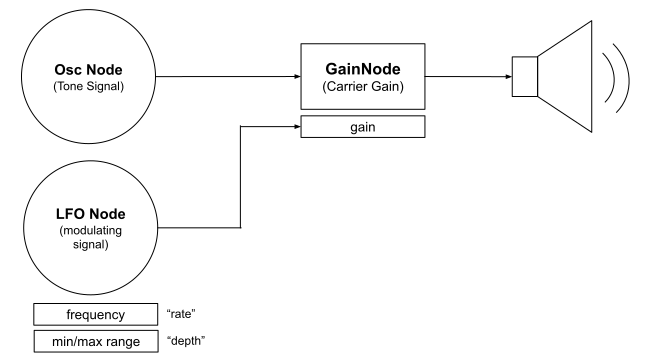
There are many other kinds of processing nodes, such as filters, delays, and reverbs, that can shape a sound in different ways by taking in an audio signal, transforming it, and passing it along. We’ll explore these more in depth later, but before we get to those, there’s a special kind of source node worth introducing. One that doesn’t produce audible sound at all: the LFO or Low Frequency Oscillator. An LFO generates a slow, repeating signal (usually below 20 Hz) that we use to modulate other parameters in our grap, like an oscillator’s frequency or a gain node’s amplitude. In other words, an LFO is a control source: it’s part of the graph, but instead of being heard, it animates other parts of the sound.


LFO diagram

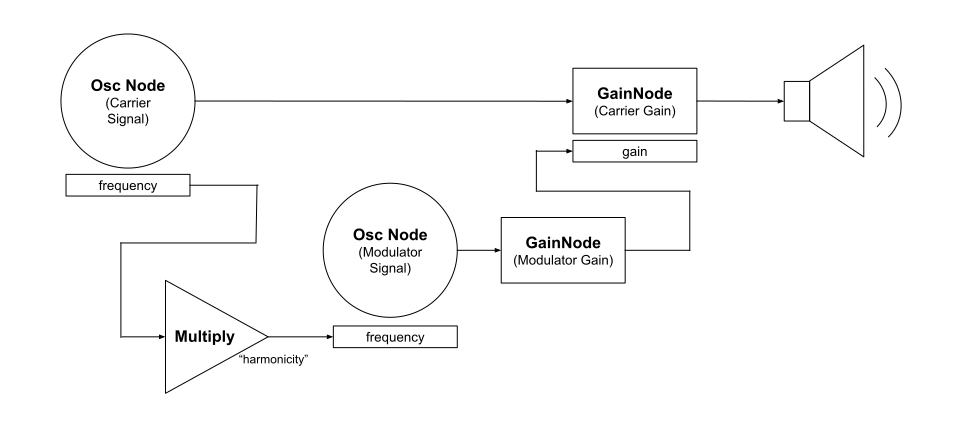
The diagram above is a visualization of the audio graph for the third example, the tremolo patch, from the demo above. Despite being a fairly simple signal chain, adding even a small amount of modulation can completely change the character and movement of our sound. What’s exciting is that slightly more complex graphs can lead to even more interesting results. For instance, by connecting a couple of oscillators and gain nodes in just the right way, we can create an amplitude modulation oscillator (AM oscillator), a setup where one oscillator modulates the amplitude of another, producing a rich, pulsing tone.

AMOscillator diagram


Tone.js makes it easy to work with these kinds of patterns because it already provides a wide selection of oscillators (see Class/Source in the Tone.js docs) and effects (see Class/Effect in the Tone.js docs), including ready-made versions of both the Tremolo and the AMOscillator. But it’s important to understand how these are built, because that knowledge opens the door to creating your own custom oscillators. These could be entirely different from anything Tone.js provides, or small variations on the built-ins. For example, the AM oscillator I created works similarly to Tone.AMOscillator—both let you control the harmonicity (the frequency relationship between the carrier and modulator), but my version also exposes an additional parameter for modulation depth, allowing finer control over how intense the effect feels. You can find that here: Tone.js > Oscillators > AMOscillator (from scratch)


built-in effects

Below is an interactive menu for testing different Tone.js effects with different settings to preview how they sound. Change the source node between Oscillator and Player to compare how different sources sound through the effect. Switch the default settings on each effect to better understand how they can each be shaped.


I've created a few demos in the editor for Tone.js / Effects as well as for Tone.js > Oscillators. Keep in mind that not every Effect is represented here, you should explore the Tone.js documentation to see all the Effects as well as all the other source nodes Tone.js has to offer.

Attribution: Text and code written by Nick Briz. The code editor icons designed by Meko and licensed under Creative Commons Attribution License (CC BY 3.0). All sounds generated using the Web Audio API and/or Tone.js by Yotam Mann and other contributors.